Brand Kit Overview
Define your brand's visual identity, voice, and content guidelines.
The Brand Kit is where you define and store everything that makes your brand visually and verbally distinct. Colors, fonts, logos, voice guidelines — when these elements are documented in one place, everyone on your team can create content that looks and sounds consistent.
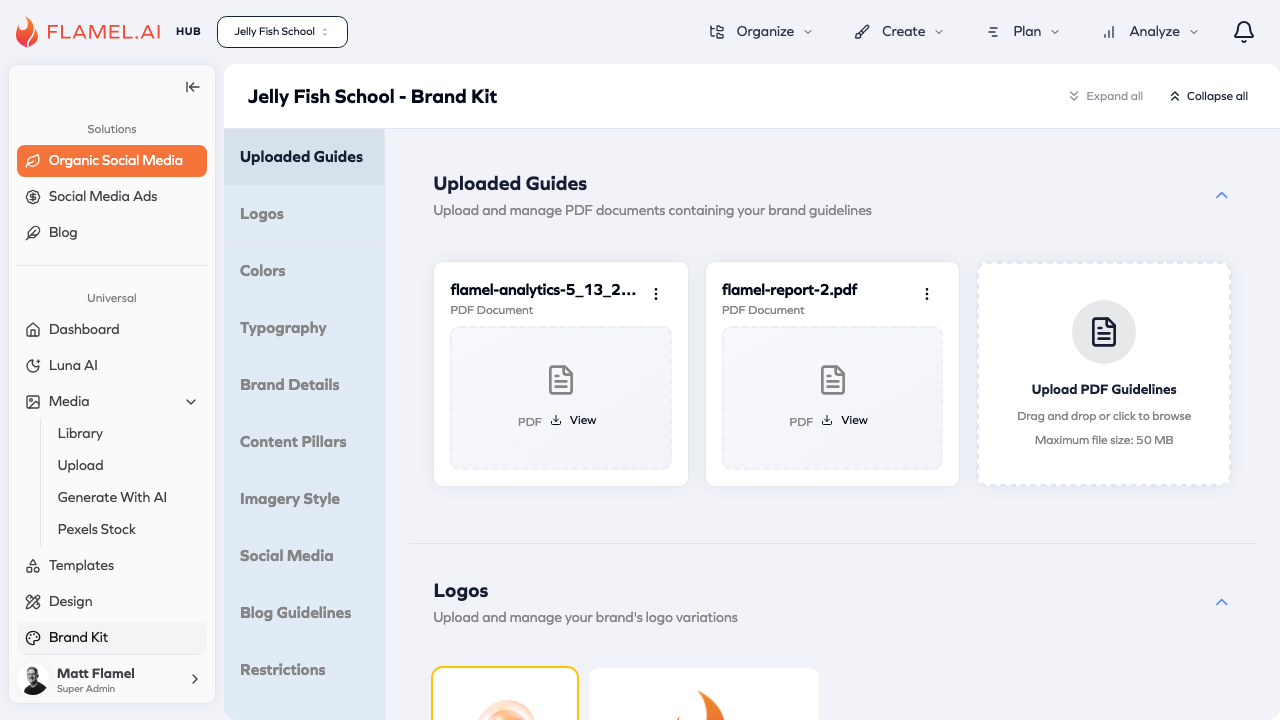
Accessing Brand Kit
Click Brand Kit in the sidebar to access your brand settings. The page displays collapsible sections for each aspect of your brand identity.
Brand Kit Sections
The Brand Kit organizes your brand assets into logical groups:
- Visual Identity — Logos, colors, and typography
- Brand Voice — Brand details, content pillars, and restrictions
- Content Guidelines — Social media, blog, and imagery guidelines
Quick Setup
| Section | What to Add |
|---|---|
| Uploaded Guides | PDF brand guidelines, style guides |
| Logos | Primary logo, icon, light/dark versions |
| Colors | Primary, secondary, accent colors (hex codes) |
| Typography | Headline and body fonts |
| Brand Details | Mission, voice, target audience |
| Content Pillars | Main themes for your content strategy |
How Brand Kit Integrates with Flamel
Once configured, your Brand Kit appears throughout Flamel:
Design Editor — Brand colors appear at the top of the color picker, brand fonts show in the font selector.
Templates — Brand elements are pre-applied where appropriate. Templates can use "brand color" settings that adapt to each user's Brand Kit.
Luna AI — Voice guidelines inform AI-generated captions and content suggestions, producing text that matches your brand's communication style.
AI Brand Analysis
If you already have brand documentation — a style guide PDF, brand book, or design guidelines — Flamel's AI can analyze these materials and extract brand information automatically.
Upload your existing materials in the Uploaded Guides section, then use the Research & Generate feature in Brand Details to have AI analyze and summarize your brand identity.
Hub users: Brand Kit settings flow to all workspaces automatically. What you configure becomes the standard for all franchisees.