Stock Media
Access free stock photos and videos from Pexels, plus GIFs from Giphy.
Sometimes you need an image right now and don't have time for a photoshoot or AI generation. That's where stock media comes in. Flamel integrates with Pexels for high-quality photos and videos, and Giphy for animated GIFs, giving you access to millions of assets without leaving the app.
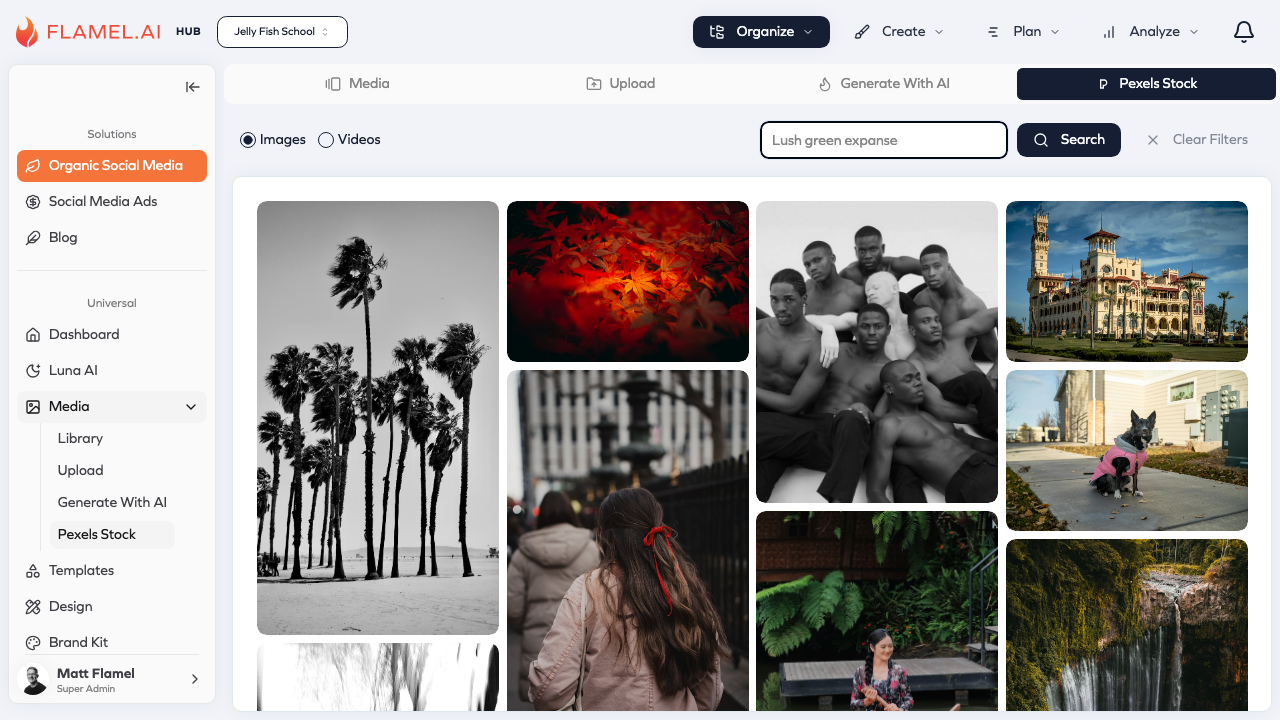
Pexels Photos and Videos
Pexels provides professional-quality stock photography and video content that's free for commercial use. These aren't the awkward, obviously-staged stock photos of the past — Pexels curates modern, authentic-looking content that fits naturally into social media.
Finding Content
Click Media in the sidebar, then select Pexels Stock to open the search interface. You'll see toggle options for Images and Videos at the top. Type what you're looking for — "coffee shop", "team meeting", "workout", "autumn leaves" — and browse the results.
Results show as a grid of thumbnails. For images, click any photo to see a larger preview. For videos, hover to preview the clip in motion. If it works for you, click to add it to your Flamel media library.
Filtering Results
When your search returns many results, use filters to narrow down options:
Color filtering lets you find images dominated by specific colors. This is incredibly useful when you're matching content to brand colors or creating a cohesive visual theme.
Orientation filtering narrows results to landscape (wide), portrait (tall), or square images. Choose based on where you'll use the content — Instagram feed posts work best with square or portrait, while Facebook link previews prefer landscape.
Giphy GIFs
GIFs add motion and personality to content in ways static images can't. They're perfect for reactions, celebrations, and adding humor to your posts. Flamel's Giphy integration lets you search and add GIFs directly when creating content.
Accessing Giphy
Giphy is available in the post editor when creating content. Look for the GIF option in the media selection interface to search Giphy's library.
Note: Giphy integration is a permission-controlled feature. If you don't see the Giphy option, your organization administrator may have disabled it. Administrators can enable Giphy in Organization > Permissions > Media Integrations.
Choosing Good GIFs
Not every GIF works for professional content. Consider the context: a GIF that's hilarious among friends might not fit your brand's voice. Watch the full animation loop before saving — some GIFs have unexpected elements partway through.
GIF quality varies widely. Higher-quality GIFs with smooth animation and clear imagery look more professional than low-resolution, choppy ones.
Using Stock Media
Once you add stock media to your library, it works exactly like any uploaded file. You can:
Use it directly in posts and campaigns. Select it from your library when adding media to content.
Edit it in the design editor. Crop to different ratios, add text overlays, apply filters, or combine with other elements to make stock images feel more custom.
Organize it into folders. Create a "Stock Images" folder to keep stock media separate from your original content, or organize by theme alongside related original assets.
Permission-Controlled Features
Both Pexels and Giphy are permission-controlled features that organization administrators can enable or disable:
| Feature | Description | Default |
|---|---|---|
| Pexels Stock Photos | Access to stock photo and video library | Enabled |
| Giphy Integration | Access to GIF library | Enabled |
If you don't see these options, check with your administrator. They can enable them in Organization > Permissions > Media Integrations.
Attribution and Licensing
Pexels photos and videos are free for commercial use under the Pexels license. You can use them in social media posts, ads, websites, and other marketing materials without paying licensing fees. Attribution isn't legally required, but photographers and videographers appreciate credit when practical.
Giphy's terms allow use in social media and digital content. Some branded GIFs (from movies, TV shows, etc.) may have additional considerations depending on how you use them. For most social media purposes, you're covered.
Both services are free because they're supported by contributors who share their work with the community. Using their content respectfully and appropriately supports this ecosystem.
Making Stock Work for You
Stock media works best as a supporting element rather than the star of your content. A stock photo as a background for text, a video clip to add production value to a story, a GIF to add personality — these uses feel natural and professional.
The trick is making stock feel like your own. Edit images to match your brand colors, add your logo or text overlays, combine multiple elements, or use stock as inspiration for your own photoshoots. The goal is content that feels distinctly yours, even when you didn't create every element from scratch.