Campaigns
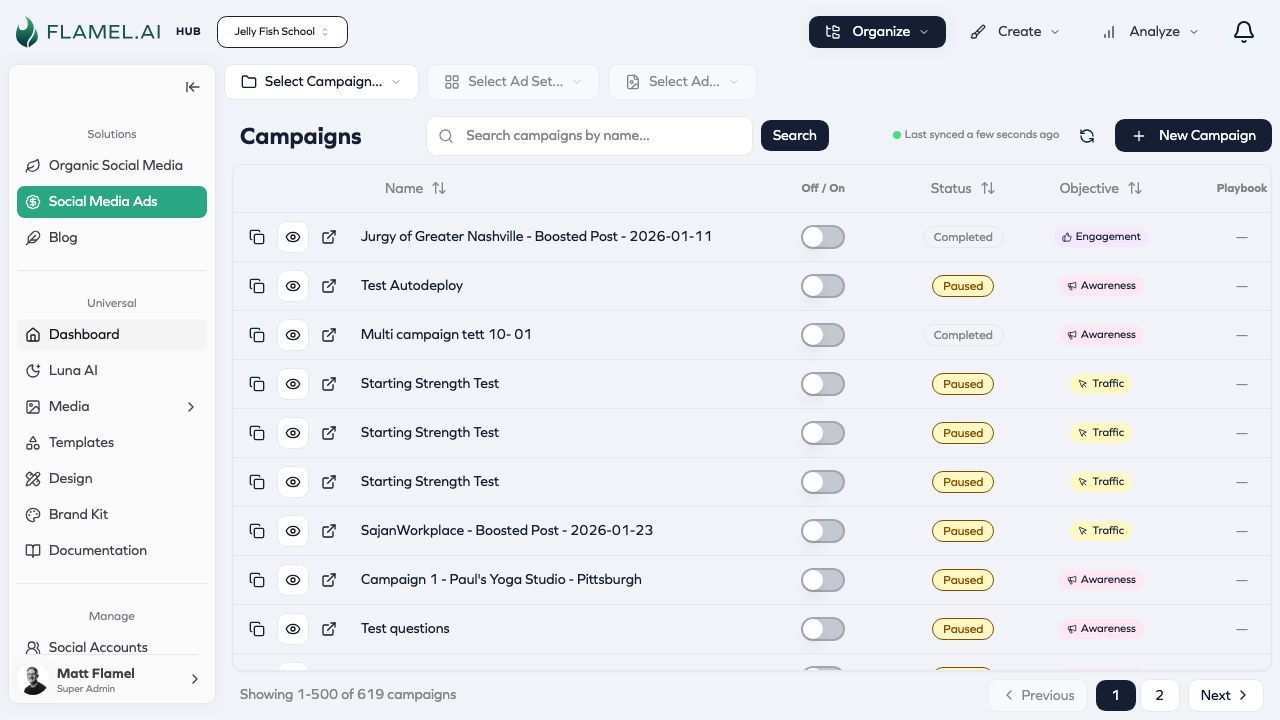
Create and manage your paid advertising campaigns.
Campaigns sit at the top of Meta's advertising hierarchy. Each campaign has a single objective that determines how the platform optimizes your ads — whether that's driving traffic, generating leads, or building awareness. Getting this foundation right affects everything that follows.
Understanding Campaign Objectives
Your campaign objective tells Meta what success looks like for your advertising. Choose it based on your actual business goal, not just what sounds good. Each objective changes how Meta delivers your ads and who sees them.
Awareness campaigns maximize how many people see your ads. Use this when you're introducing a new brand, product, or location and want maximum exposure. Meta optimizes for impressions and reach rather than specific actions.
Traffic campaigns drive clicks to your website or landing page. Choose this when you want people to visit a specific URL, whether that's your homepage, a product page, or a promotional landing page. Meta optimizes for clicks and landing page views.
Engagement campaigns generate interactions with your content — likes, comments, shares, and saves. This objective works well for building community and social proof, though the actions don't necessarily translate to business results.
Leads campaigns capture contact information through Meta's instant forms. When someone clicks your ad, a form opens pre-filled with their Facebook information. This is powerful for service businesses, real estate, and anyone who follows up with prospects directly.
Sales campaigns drive conversions on your website — purchases, sign-ups, or other valuable actions you track with your Meta Pixel. This objective requires conversion tracking set up correctly but delivers the most directly measurable business results.
Creating a Campaign
Navigate to the Paid Social Ads module by selecting Social Media Ads in the sidebar. From there, click Organize > Campaigns to see your existing campaigns, or click Create > New Campaign to start fresh.
The creation flow walks you through selecting your objective, configuring campaign-level settings like budget strategy, and then building out your ad sets and ads. Most campaigns need at least one ad set with targeting and at least one ad with creative before they can launch.
Campaign Budget Optimization
One of the most important campaign-level decisions is whether to use Campaign Budget Optimization (CBO), which Meta now calls Advantage Campaign Budget.
With CBO enabled, you set a budget at the campaign level and Meta automatically distributes spend across your ad sets based on performance. If one ad set is outperforming others, Meta shifts more budget there without you having to adjust manually.
Without CBO, you set budgets individually on each ad set. This gives you direct control but requires more active management. It's useful when you have specific spending requirements per audience or when you're testing with controlled variables.
When to use CBO: You have multiple ad sets with similar targeting approaches and want Meta to find the best performers automatically. Most campaigns benefit from CBO.
When to use ad set budgets: You need precise control over how much each audience receives, perhaps because different audiences represent different business priorities or you're running a structured test.
Campaign Status and Learning
Every campaign goes through phases that affect its performance:
| Status | What It Means |
|---|---|
| Active | Running and spending budget normally |
| Paused | Stopped by you, not spending |
| Learning | Meta is gathering data to optimize delivery |
| Error | Something needs attention before the campaign can run |
The learning phase is particularly important to understand. When you launch a campaign or make significant changes, Meta needs approximately 50 conversion events (or optimization events for non-conversion campaigns) to learn who responds best to your ads. During this phase, performance is volatile and costs may be higher.
Making changes during the learning phase — adjusting budgets, modifying targeting, editing creative — often resets the learning, extending the instability. If possible, wait until learning completes before making optimizations.
Managing Existing Campaigns
From the campaigns list, you can take several actions on any campaign. Click the campaign row to open its details, or use the menu to pause, activate, duplicate, or delete.
Pausing stops all spending immediately while preserving everything you've set up. Use this when you need to stop temporarily — perhaps during a promotion that ended or while you investigate performance issues.
Duplicating creates a copy of the campaign with all its settings, which you can then modify. This is faster than creating from scratch when you want a similar campaign with tweaks.
Editing lets you change campaign settings, though be aware that significant changes may reset the learning phase. Some settings like objective cannot be changed after creation — you'd need to create a new campaign.
Deleting removes the campaign permanently. Historical data remains in your analytics, but you cannot recover a deleted campaign.