Playbook Opt-In - Step-by-Step UI Walkthrough
Detailed click-by-click guide to discovering playbooks, opting in, and managing your campaigns.
This guide walks through every element of the playbook opt-in process in exact order. Use this as a reference when opting into playbooks or troubleshooting issues.
Part 1: Playbook Shop (Discovery)
Path: Paid Social Ads → Playbooks → Shop
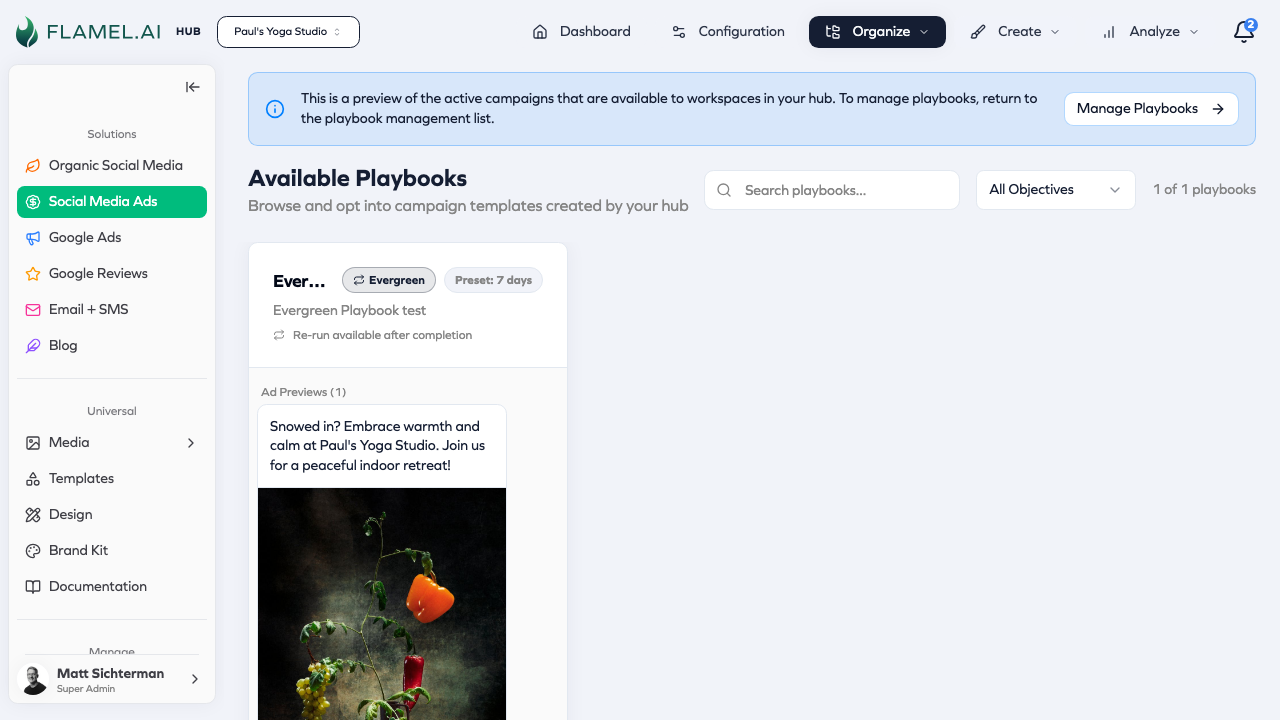
Page Header
| Element | Description |
|---|---|
| Title | "Available Playbooks" |
| Subtitle | "Browse and opt into campaign templates created by your hub" |
Hub Preview Banner (Hub Users Only)
If you're a Hub user viewing the shop:
┌─────────────────────────────────────────────────────────────────┐
│ ℹ️ This is a preview of the active campaigns that are           │
│    available to workspaces in your hub. To manage playbooks,    │
│    return to the playbook management list.                      │
│                                            [Manage Playbooks →] │
└─────────────────────────────────────────────────────────────────┘
Filter & Search
Use the search bar to find playbooks by name or description. Filter by objective (Sales, Lead Generation, Engagement, Traffic, Awareness). If you've already opted into playbooks, click My Playbooks to view them.
Playbook Card Grid
Cards display in a responsive grid:
- Large screens: 3 columns
- Medium screens: 2 columns
- Small screens: 1 column
Individual Playbook Card
┌─────────────────────────────────────────────────────────────┐
│ Summer Sale Campaign              [Evergreen] [Jan 1-Feb 15]│
│ ─────────────────────────────────────────────────────────── │
│ Promote your summer sale with targeted ads to local         │
│ customers and drive foot traffic to your location...        │
│                                                             │
│ 🔄 Re-run available after completion                        │
│                                                             │
│ ┌─────────────────────────────────────────────────────────┐ │
│ │                   [Ad Preview Carousel]                 │ │
│ │              ◀  Image 1 of 3  ▶                        │ │
│ └─────────────────────────────────────────────────────────┘ │
│                                                             │
│ ┌────────────────────┐  ┌────────────────────┐             │
│ │ Budget             │  │ Schedule           │             │
│ │ Recommended        │  │ Jan 15 - Feb 15    │             │
│ │ $1,200             │  │                    │             │
│ └────────────────────┘  └────────────────────┘             │
│                                                             │
│ [View Details]                        [Opt In]              │
└─────────────────────────────────────────────────────────────┘
Card Elements in Order
| Element | Location | Description |
|---|---|---|
| Playbook Name | Top-left | Bold, truncated to 1 line |
| Evergreen Badge | Top-right | Blue pill with repeat icon (if evergreen) |
| Schedule Badge | After evergreen badge | Date range (if set) |
| Description | Below title | Gray text, max 2 lines |
| Re-run Note | Below description | "Re-run available after completion" (evergreen only) |
| Ad Preview | Center | Carousel of ad creatives |
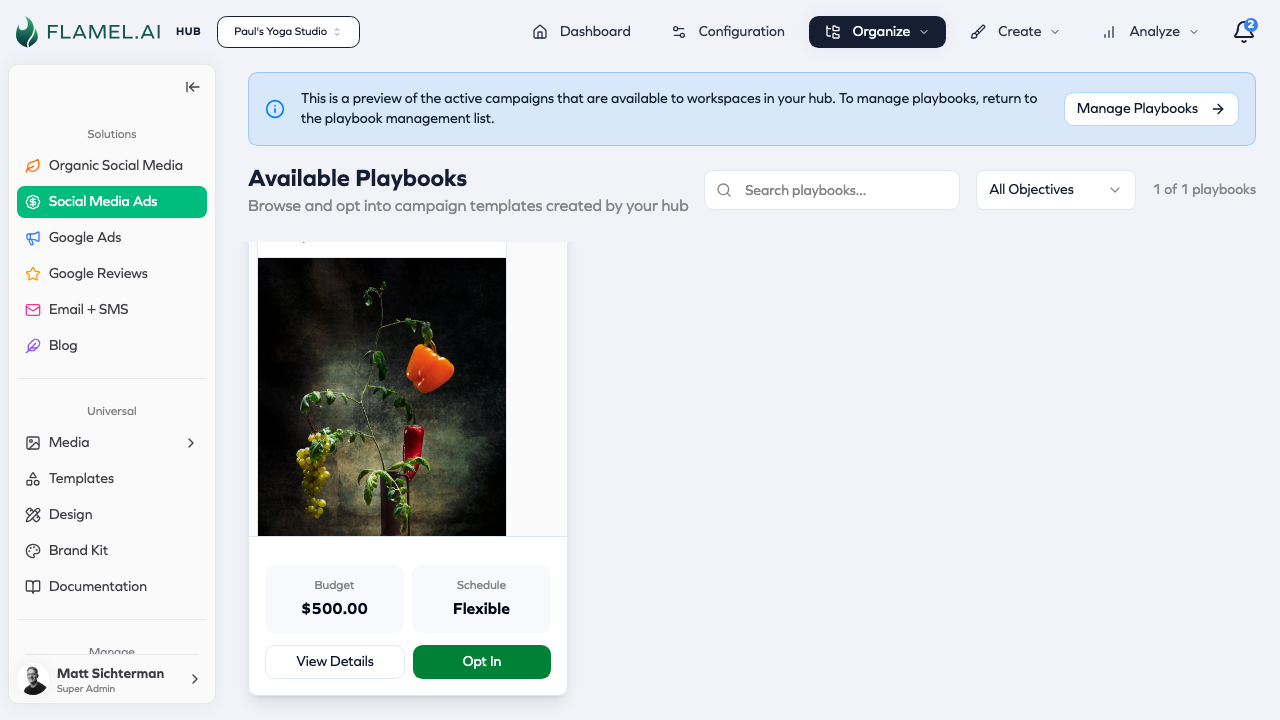
| Budget Box | Bottom-left | Shows amount and "Recommended" label |
| Schedule Box | Bottom-right | Shows date range or "Flexible" |
| View Details | Bottom button (left) | Opens playbook detail page |
| Opt In | Bottom button (right) | Opens opt-in modal |
Budget Box Values
| Display | Meaning |
|---|---|
| "$1,200" with "Budget" | Fixed budget |
| "$1,200" with "Recommended" | Workspace can customize |
| "$500/day" | Daily budget type |
Schedule Box Values
| Display | Meaning |
|---|---|
| "Jan 15 - Feb 15" | Fixed date range |
| "From Jan 15" | Start date only |
| "Flexible" | Workspace sets schedule |
| "No Schedule" | No dates configured |
Opt In Button States
| State | Appearance | When |
|---|---|---|
| Normal | Green, "Opt In" | Default |
| Re-run | Green, "Opt In Again" | Completed evergreen playbook |
| Disabled | Gray, tooltip | Hub user viewing preview |
Empty State
When no playbooks match filters:
┌─────────────────────────────────────────────────────────────┐
│                          🛒                                 │
│                                                             │
│              No playbooks match your filters                │
│                                                             │
│           Try adjusting your search or filters              │
└─────────────────────────────────────────────────────────────┘
Part 2: Opt-In Modal
Clicking "Opt In" opens a modal dialog.
Modal Layout
┌─────────────────────────────────────────────────────────────────────┐
│ Opt Into Summer Sale Campaign                                   [X] │
├────────────────────┬────────────────────────────────────────────────┤
│                    │                                                │
│  LAUNCH CHECKLIST  │  [Content Area - Scrollable]                   │
│                    │                                                │
│  ○ Schedule        │  ┌──────────────────────────────────────────┐  │
│  ○ Budget          │  │ Section 1: Schedule                      │  │
│  ○ Ad #1 Media     │  │ ...                                      │  │
│  ○ Ad #2 Media     │  └──────────────────────────────────────────┘  │
│  ● Questions       │                                                │
│  ○ Review          │  ┌──────────────────────────────────────────┐  │
│                    │  │ Section 2: Budget                        │  │
│                    │  │ ...                                      │  │
│                    │  └──────────────────────────────────────────┘  │
│                    │                                                │
├────────────────────┴────────────────────────────────────────────────┤
│                                          [Cancel]  [Submit & Deploy]│
└─────────────────────────────────────────────────────────────────────┘
Modal Header
| Element | Description |
|---|---|
| Title | "Opt Into [Playbook Name]" |
| Close Button | X icon in top-right corner |
Launch Checklist (Left Sidebar)
Tracks your progress through required steps:
Checklist Item States
| Icon | Meaning |
|---|---|
| ○ (empty circle) | Not completed |
| ● (filled circle) | Completed |
| ⚠️ (warning) | Needs attention |
Typical Checklist Items
| Item | Required | When Shown |
|---|---|---|
| Schedule | If no hub schedule | Evergreen playbooks |
| Budget | If customizable | When workspace can set budget |
| Ad Media | Yes | Workspace-level creatives |
| Questions | Depends | If playbook has questions |
| Review | Always | Always shown last |
Section 1: Schedule Configuration
Shown when: Evergreen playbook OR workspace can set schedule
┌─────────────────────────────────────────────────────────────────┐
│ Schedule                                                        │
│ ─────────────────────────────────────────────────────────────── │
│                                                                 │
│ Campaign starts                      Campaign ends              │
│ ┌─────────────────────┐              ┌─────────────────────┐    │
│ │ 📅 Jan 15, 2025    ▼│              │ 📅 Feb 15, 2025    ▼│    │
│ │    12:00 AM         │              │    11:59 PM         │    │
│ └─────────────────────┘              └─────────────────────┘    │
│                                                                 │
└─────────────────────────────────────────────────────────────────┘
Start Date Picker
| Property | Value |
|---|---|
| Label | "Campaign starts" |
| Type | Date picker with time |
| Default | Tomorrow at 12:00 AM |
| Minimum | 24 hours from now |
To set start date:
- Click the date field
- Calendar popover appears
- Select a date
- Optionally adjust time
- Click outside to close
End Date Picker
| Property | Value |
|---|---|
| Label | "Campaign ends" |
| Type | Date picker with time |
| Default | 30 days after start at 11:59 PM |
| Shown | Lifetime budgets only |
Validation:
- End date must be after start date
- Start date must be at least 24 hours from now
Section 2: Budget Configuration
Shown when: Workspace can customize budget
┌─────────────────────────────────────────────────────────────────┐
│ Budget                                                          │
│ ─────────────────────────────────────────────────────────────── │
│                                                                 │
│ ○ Use Recommended ($1,200)                                      │
│ ● Custom Budget                                                 │
│                                                                 │
│ Budget Type                                                     │
│ ┌─────────────────────┐                                         │
│ │ Lifetime         ▼  │                                         │
│ └─────────────────────┘                                         │
│                                                                 │
│ Total Budget                                                    │
│ ┌─────────────────────┐                                         │
│ │ $  1,500.00         │                                         │
│ └─────────────────────┘                                         │
│ Minimum: $5 (lifetime)                                          │
│                                                                 │
│ ┌─────────────────────────────────────────────────────────────┐ │
│ │ Budget Allocation                                           │ │
│ │ Campaign 1: $750.00 (50%)                                   │ │
│ │ Campaign 2: $750.00 (50%)                                   │ │
│ └─────────────────────────────────────────────────────────────┘ │
│                                                                 │
└─────────────────────────────────────────────────────────────────┘
Budget Decision Toggle
| Option | Description |
|---|---|
| Use Recommended | Uses the playbook's default budget |
| Custom Budget | Lets you enter your own amount |
Budget Type Selector
| Option | Description |
|---|---|
| Lifetime | Total spend over campaign duration |
| Daily | Spend per day |
Budget Input Field
| Property | Value |
|---|---|
| Label | "Total Budget" |
| Type | Currency input |
| Format | $ X,XXX.XX |
| Min (Daily) | $1.00 |
| Min (Lifetime) | $5.00 |
To set budget:
- Select "Custom Budget"
- Choose budget type
- Enter amount
- Help text shows minimum
Budget Allocation Display
Read-only breakdown showing how budget splits across campaigns:
- Shows each campaign name
- Amount allocated
- Percentage of total
When to Choose Each Budget Option
| Your Situation | Recommendation |
|---|---|
| First time running this playbook | Use Recommended—your Hub set this based on network experience |
| Past playbooks underperformed | Try increasing 20-30% above recommended |
| Limited budget this month | Set custom budget at your affordable amount |
| High-traffic season (holidays, etc.) | Increase 30-50% above recommended to capture demand |
| Testing a new market | Start with recommended, increase if results are good |
Lifetime vs Daily Budget
| Budget Type | Best For | Avoid If |
|---|---|---|
| Lifetime | Fixed campaigns with clear end dates; controlled total spend | You need consistent daily pacing |
| Daily | Ongoing campaigns; consistent daily presence | Campaign is only 2-3 days (daily may not fully spend) |
Rule of thumb: Use Lifetime for promotional campaigns (Black Friday, Grand Opening). Use Daily for ongoing brand presence campaigns.
Section 3: Creative Mode Selection
Shown when: Always (determines workflow)
┌─────────────────────────────────────────────────────────────────┐
│ Creative Source                                                 │
│ ─────────────────────────────────────────────────────────────── │
│                                                                 │
│ ┌───────────────────┐ ┌───────────────────┐ ┌─────────────────┐ │
│ │ ✓ Playbook-Level  │ │   Workspace-Level │ │ Boosted Posts   │ │
│ │                   │ │                   │ │                 │ │
│ │ Hub provides the  │ │ Upload your own   │ │ Boost existing  │ │
│ │ media. Use as-is. │ │ media for ads.    │ │ organic posts.  │ │
│ └───────────────────┘ └───────────────────┘ └─────────────────┘ │
│                                                                 │
└─────────────────────────────────────────────────────────────────┘
| Mode | Description | When Available |
|---|---|---|
| Playbook-Level | Use Hub's provided media | Always (if Hub provides) |
| Workspace-Level | Upload your own images/videos | If enabled by Hub |
| Boosted Posts | Boost existing organic posts | Boosted posts playbooks |
Section 4: Media Upload (Workspace-Level Creatives)
Shown when: Creative mode is "Workspace-Level"
┌─────────────────────────────────────────────────────────────────┐
│ Upload Media for Ad #1                                          │
│ ─────────────────────────────────────────────────────────────── │
│                                                                 │
│ [Marketing Images] [Square Images] [Logo Images]                │
│                                                                 │
│ ┌─────────────────────────────────────────────────────────────┐ │
│ │                                                             │ │
│ │     📁 Drop images here or click to browse                 │ │
│ │                                                             │ │
│ │     Accepted: JPG, PNG, GIF, WebP                          │ │
│ │     Max size: 8MB per image                                │ │
│ │                                                             │ │
│ └─────────────────────────────────────────────────────────────┘ │
│                                                                 │
│ Selected: 3 images                                              │
│ ┌─────┐ ┌─────┐ ┌─────┐                                        │
│ │ 📷  │ │ 📷  │ │ 📷  │                                        │
│ │ [X] │ │ [X] │ │ [X] │                                        │
│ └─────┘ └─────┘ └─────┘                                        │
│                                                                 │
└─────────────────────────────────────────────────────────────────┘
Media Type Tabs
| Tab | Purpose |
|---|---|
| Marketing Images | Primary ad images |
| Square Images | Square format for feeds |
| Logo Images | Small logos for sidebar/bottom |
Upload Drop Zone
| Property | Value |
|---|---|
| Action | Drag & drop OR click to browse |
| Formats | JPG, PNG, GIF, WebP |
| Max size | 8MB per image |
| Minimum | 1 image per ad |
To upload:
- Drag images onto the drop zone, OR
- Click the zone to open file browser
- Select images
- Images appear as thumbnails below
Image Thumbnails
Each uploaded image shows:
- Preview thumbnail
- X button to remove
- Drag handle to reorder (if multiple)
To remove an image:
- Hover over the thumbnail
- Click the X button
Section 5: Post Selection (Boosted Posts Mode)
Shown when: Creative mode is "Boosted Posts"
┌─────────────────────────────────────────────────────────────────┐
│ Select Post to Boost                                            │
│ ─────────────────────────────────────────────────────────────── │
│                                                                 │
│ ┌─────────────────────────────────────────────────────────────┐ │
│ │ Select a post...                                         ▼  │ │
│ └─────────────────────────────────────────────────────────────┘ │
│                                                                 │
│ ┌─────────────────────────────────────────────────────────────┐ │
│ │ 📷 "Check out our new summer menu! Fresh ingredients..."   │ │
│ │    Posted Jan 10, 2025 • 234 likes                         │ │
│ ├─────────────────────────────────────────────────────────────┤ │
│ │ 📷 "Happy hour starts at 4pm every weekday! Join us..."    │ │
│ │    Posted Jan 8, 2025 • 156 likes                          │ │
│ ├─────────────────────────────────────────────────────────────┤ │
│ │ 📷 "Meet our team! Here's Sarah, our head chef..."         │ │
│ │    Posted Jan 5, 2025 • 89 likes                           │ │
│ └─────────────────────────────────────────────────────────────┘ │
│                                                                 │
└─────────────────────────────────────────────────────────────────┘
To select a post:
- Click the dropdown
- Scroll through your published posts
- Click to select
- Post thumbnail and excerpt show as selected
Section 6: Opt-In Questions
Shown when: Playbook has questions configured
┌─────────────────────────────────────────────────────────────────┐
│ Questions                                                       │
│ ─────────────────────────────────────────────────────────────── │
│                                                                 │
│ What neighborhoods do you serve? *                              │
│ ┌─────────────────────────────────────────────────────────────┐ │
│ │ Downtown, Capitol Hill, Cherry Creek                        │ │
│ └─────────────────────────────────────────────────────────────┘ │
│                                                                 │
│ What is your typical customer age range? *                      │
│ ┌─────────────────────────────────────────────────────────────┐ │
│ │ 25-45                                                    ▼  │ │
│ └─────────────────────────────────────────────────────────────┘ │
│                                                                 │
│ Any special promotions to highlight?                            │
│ ┌─────────────────────────────────────────────────────────────┐ │
│ │ 20% off first visit                                         │ │
│ └─────────────────────────────────────────────────────────────┘ │
│                                                                 │
│ ☐ I'm not interested in ads at this time                       │
│   (Answer questions only, no campaign will be deployed)        │
│                                                                 │
└─────────────────────────────────────────────────────────────────┘
Question Types
| Type | Input | Description |
|---|---|---|
| Text | Single line input | Free-form answer |
| Multi-select | Checkboxes or multi-dropdown | Select multiple options |
| Select | Dropdown | Choose one option |
Required Questions
- Marked with asterisk (*) after label
- Must have a response to continue
- Validation error if empty
Questions-Only Toggle
| Property | Value |
|---|---|
| Label | "I'm not interested in ads at this time" |
| Description | "Answer questions only, no campaign will be deployed" |
| Effect | Hides budget/media sections, submits as questions_only status |
Section 7: Review Playbook
Shown when: Always (last section)
┌─────────────────────────────────────────────────────────────────┐
│ Review Your Campaign                                            │
│ ─────────────────────────────────────────────────────────────── │
│                                                                 │
│ Campaign Structure                                              │
│ • 2 Campaigns                                                   │
│ • 4 Ad Sets                                                     │
│ • 8 Ads                                                         │
│                                                                 │
│ ┌─────────────────────────────────────────────────────────────┐ │
│ │                   [Ad Preview Carousel]                     │ │
│ │              ◀  Ad 1 of 8  ▶                               │ │
│ │                                                             │ │
│ │  Your location name and details appear in ad text          │ │
│ └─────────────────────────────────────────────────────────────┘ │
│                                                                 │
│ Targeting                                                       │
│ • Location: 15-mile radius around your location                │
│ • Age: 25-54                                                   │
│ • Audience: Database customers                                 │
│                                                                 │
└─────────────────────────────────────────────────────────────────┘
What to Review
| Element | Description |
|---|---|
| Campaign Structure | Number of campaigns, ad sets, and ads |
| Ad Previews | Carousel showing your ads with location data |
| Targeting | Audience, location, demographics |
| Budget | Total investment |
| Schedule | Start and end dates |
Ad Preview Carousel
- Navigate with arrows or swipe
- Shows ads with YOUR location data inserted
- Check that text, images, and CTAs look correct
Modal Footer
┌─────────────────────────────────────────────────────────────────┐
│                                                                 │
│ ⚠️ Complete all required sections before submitting            │
│                                                                 │
│                                 [Cancel]    [Submit & Deploy]   │
└─────────────────────────────────────────────────────────────────┘
Cancel Button
| Property | Value |
|---|---|
| Style | Outline |
| Action | Closes modal, discards changes |
| Disabled | During submission |
Submit & Deploy Button
| Property | Value |
|---|---|
| Style | Primary (green) |
| Text | "Submit & Deploy" (or "Update & Resubmit" for resubmit) |
| Enabled | When all required checklist items complete |
| Loading State | Shows "Deploying..." with spinner |
Validation Message
Shown if trying to submit with incomplete requirements:
- Red text with warning icon
- Lists which sections need completion
Part 3: Deployment Progress
After clicking "Submit & Deploy":
┌─────────────────────────────────────────────────────────────────┐
│ Deploying Your Campaigns                                        │
│ ─────────────────────────────────────────────────────────────── │
│                                                                 │
│ ✓ Campaign 1: Summer Sale - Awareness          Created         │
│ ✓   Ad Set 1: Local Audience                   Created         │
│ ✓   Ad Set 2: Lookalike Audience               Created         │
│ ⏳ Campaign 2: Summer Sale - Conversion        Creating...     │
│ ○   Ad Set 1: Database                         Pending         │
│                                                                 │
│ ┌─────────────────────────────────────────────────────────────┐ │
│ │ Creating campaign 2 of 2...                                 │ │
│ │ Setting up ad sets...                                       │ │
│ │ Configuring targeting...                                    │ │
│ └─────────────────────────────────────────────────────────────┘ │
│                                                                 │
└─────────────────────────────────────────────────────────────────┘
Progress Indicators
| Icon | Meaning |
|---|---|
| ✓ | Successfully created |
| ⏳ | Currently creating |
| ○ | Pending (not started) |
| ✗ | Failed |
Log Output
Real-time deployment events:
- Green text for successes
- Yellow for warnings
- Red for errors
- Auto-scrolls to latest
Part 4: Success Celebration
After successful deployment:
┌─────────────────────────────────────────────────────────────────┐
│                                                                 │
│                          🎉                                     │
│                                                                 │
│                      You're on fire!                            │
│               Your campaigns are now deploying!                 │
│                                                                 │
│ ┌─────────────────────────────────────────────────────────────┐ │
│ │ Playbook:    Summer Sale Campaign                          │ │
│ │ Investment:  $1,500.00                                     │ │
│ │ Campaigns:   2 campaigns created                           │ │
│ └─────────────────────────────────────────────────────────────┘ │
│                                                                 │
│             [Keep Shopping]    [View My Playbooks]              │
│                                                                 │
└─────────────────────────────────────────────────────────────────┘
Special Effects
- Confetti animation bursts from the party icon
- Multiple bursts for celebration
Action Buttons
| Button | Action |
|---|---|
| Keep Shopping | Closes dialog, stays on shop page |
| View My Playbooks | Navigates to My Playbooks page |
Part 5: My Playbooks Page
Path: Paid Social Ads → Playbooks → My Playbooks
Page Header
| Element | Description |
|---|---|
| Title | "My Playbook Opt-Ins" |
| Subtitle | "Manage your opted-in playbook campaigns and track performance" |
Filter Bar
| Element | Description |
|---|---|
| Search | Filter by playbook name |
| Status Filter | All, Active, Completed, Paused, Needs Revision, etc. |
| Results Count | "X of Y playbooks" |
| Browse More | Link back to shop |
My Playbook Card
┌─────────────────────────────────────────────────────────────────┐
│ Summer Sale Campaign              [Active]  [Run 2]  [⋮]       │
│ ─────────────────────────────────────────────────────────────── │
│ Downtown Location • Opted in: Jan 10, 2025                      │
│ 🔄 Evergreen - Runs Jan 15 - Feb 15                            │
│                                                                 │
│ ┌─────────────────────────────────────────────────────────────┐ │
│ │                   [Ad Preview Carousel]                     │ │
│ └─────────────────────────────────────────────────────────────┘ │
│                                                                 │
│ Budget: $1,500 (lifetime)                                       │
│ 2 Campaigns • 4 Adsets • 8 Ads                                 │
│                                                                 │
│ [View Analytics]                          [Open in Ads Manager] │
└─────────────────────────────────────────────────────────────────┘
Status Badges
| Badge | Color | Meaning |
|---|---|---|
| Active | Green | Campaign is running |
| Completed | Gray | Campaign finished |
| Paused | Yellow | Temporarily stopped |
| Pending Review | Orange | Awaiting Hub approval |
| Needs Revision | Orange (emphasized) | Hub requested changes |
| Questions Only | Teal | No ads deployed |
| Deploying | Blue | Currently deploying |
Run Number Badge
- Shows "Run 2", "Run 3", etc. for re-runs
- Only visible if
runNumber > 1
Actions Menu (⋮)
Click to reveal:
- Stop Evergreen Playbook — Stops recurring playbook (with confirmation)
Changes Requested Banner
When Hub requests changes:
┌─────────────────────────────────────────────────────────────────┐
│ ⚠️ Changes Requested                                            │
│ ─────────────────────────────────────────────────────────────── │
│ "Please update the main image to include your store logo"       │
│                                                                 │
│                                        [Update & Resubmit]      │
└─────────────────────────────────────────────────────────────────┘
Part 6: Resubmit Mode
When Hub requests changes and you click "Update & Resubmit":
Differences from Normal Opt-In
| Aspect | Normal Opt-In | Resubmit Mode |
|---|---|---|
| Title | "Opt Into..." | "Update & Resubmit..." |
| Sections | All sections | Usually only media/questions |
| Pre-filled | Empty | Previous values shown |
| Hub Feedback | None | Banner shows change request |
| Submit Button | "Submit & Deploy" | "Update & Resubmit" |
| Result | New deployment | Returns to "Pending Review" |
Part 7: Re-Run Mode (Evergreen Playbooks)
When clicking "Re-run Playbook" on a completed evergreen playbook:
Differences from Normal Opt-In
| Aspect | Normal Opt-In | Re-Run Mode |
|---|---|---|
| Title | "Opt Into..." | "Re-run..." |
| Schedule Default | Tomorrow | Same duration, starting tomorrow |
| Media | Empty | Can reuse previous |
| Budget | Playbook default | Previous run's budget |
| Questions | Empty | Reset for new responses |
| Run Number | 1 | Increments (2, 3, etc.) |
Validation Quick Reference
Budget Validation
| Budget Type | Minimum |
|---|---|
| Daily | $1.00 |
| Lifetime | $5.00 |
Schedule Validation
| Rule | Requirement |
|---|---|
| Start date | At least 24 hours from now |
| End date | Must be after start date |
Media Validation
| Rule | Requirement |
|---|---|
| Minimum | 1 image per ad |
| Formats | JPG, PNG, GIF, WebP |
| Max size | 8MB per image |
Questions Validation
| Rule | Requirement |
|---|---|
| Required questions | Must have a response |
| Multi-select (required) | At least one selection |
Troubleshooting
"Submit & Deploy" button is disabled
Cause: Required checklist items not complete
Fix: Check the Launch Checklist sidebar for incomplete items (empty circles)
Deployment failed
Cause: Various (network, Meta API, etc.)
Fix:
- Note the error message
- Close modal
- Try opting in again
- If persistent, contact support
Can't see my playbooks
Cause: No playbooks published by your Hub
Fix: Contact your Hub admin to create and publish playbooks
Images won't upload
Cause: Wrong format or too large
Fix:
- Use JPG, PNG, GIF, or WebP
- Keep files under 8MB
- Try compressing images
Next Steps
- Opting Into Playbooks — Conceptual guide with tips
- Managing Playbooks — Hub management guide
- FAQ — Common questions answered